UI / UX Design
StuCam
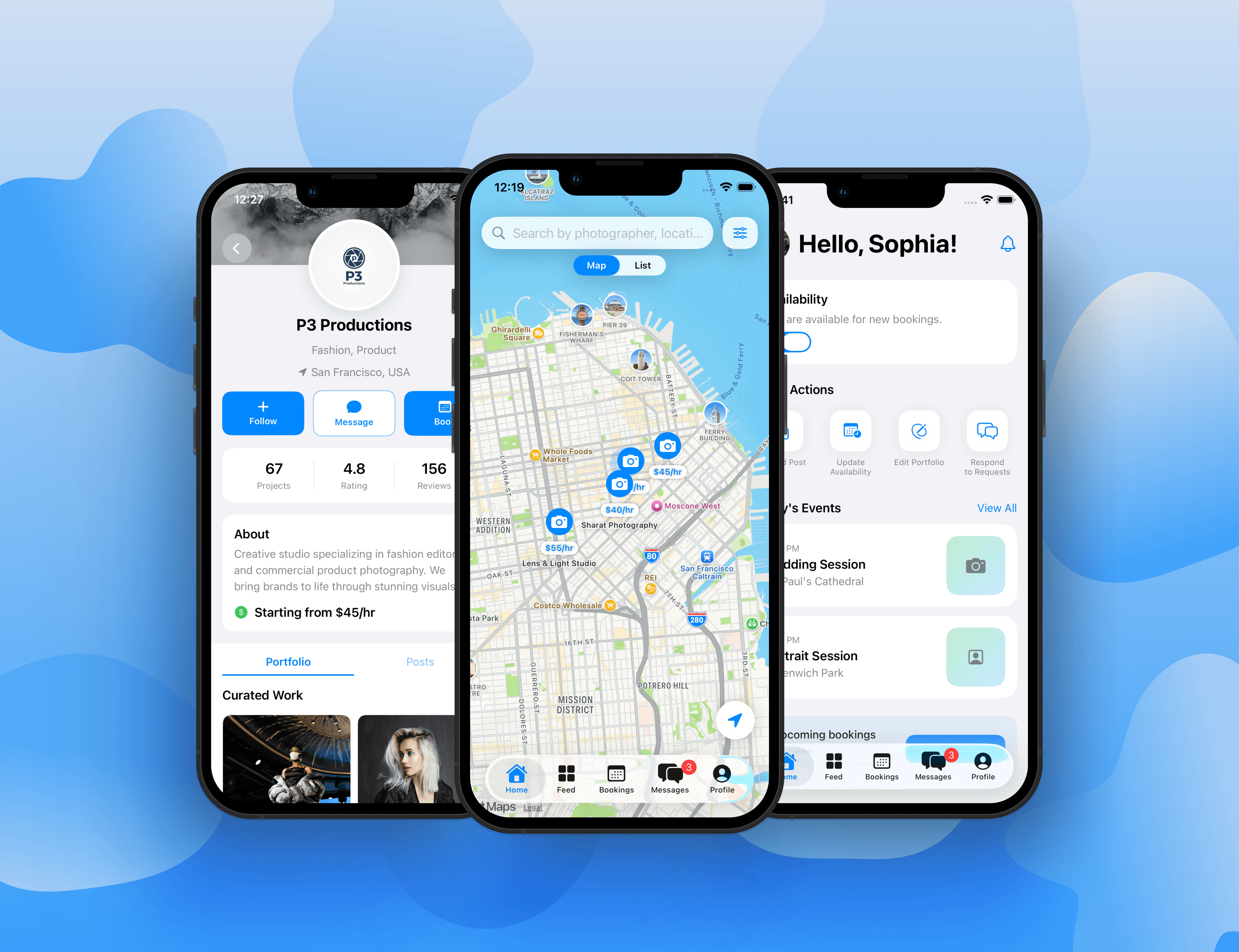
StuCam is a local-first photography booking app designed to make finding and booking nearby photographers simpler, clearer, and more trustworthy.
Type :
Mobile App
Timeline :
Aug – Dec 2025
Context :
Master's Capstone
Role :
Product Design
Project Background & Personal Journey
StuCam started from a real-life moment when I met a singer on a bus who needed someone to shoot short videos/reels of her performance, but she did not know where to find an affordable and reliable local videographer. That moment made me realize there is a gap between people who need quick creative help and photographers or creators who are looking for real paid opportunities.
StuCam explores how a local-first booking platform can make it easier for clients to discover, compare, and book nearby photographers through portfolios, pricing, availability, and in-app messaging.
The Problem
Hiring a photographer should feel simple, but the current process is often fragmented, informal, and difficult to trust. Clients usually rely on Instagram DMs, word-of-mouth, or Facebook groups, which can make it hard to compare pricing, availability, style, and reliability in one place.
At the same time, beginner and emerging photographers often have the skills to take on real projects, but struggle to find paid gigs, build credibility, and communicate their value professionally.
Problem Statement:
There is no dedicated, local-first platform that helps clients and emerging photographers connect efficiently, affordably, and safely while providing the trust signals needed to feel confident before booking.
Research & Insights
I researched both sides of the marketplace — clients looking for photography services, and photographers trying to get booked.
Research Approach
Observation
Real-life problem discovery
Informal Conversations
Client + photographer needs
Interview Planning
Trust, pricing, safety, availability
Competitor Review
Instagram, Fiverr, Upwork, Snappr
Key Insights
• Trust comes first — clients need proof before booking someone new.
• Availability matters — users often need someone available soon, not the “best” option.
• Pricing should be clear — visible rates reduce awkward negotiation.
• Beginners need structure — new photographers need tools that help them look credible.
• Local discovery is key — distance and nearby availability shape booking decisions.
User Archetypes
Based on the research, I identified four key user archetypes that shaped the design direction for StuCam. These archetypes helped me understand the different motivations, pain points, and expectations across both sides of the marketplace.
Portfolio Builder
A beginner photographer who wants real-world experience, paid gigs, and portfolio credibility.
Needs: visibility, trust, client opportunities
Pain point: people hesitate to book them without proof of experience
Opportunity: curated portfolio, reviews, and profile credibility
Budget Creator
A student, artist, or small business owner who needs affordable photography or reel content.
Needs: clear pricing, reliable options, simple booking
Pain point: professional services feel too expensive or hard to compare
Opportunity: transparent rates, filters, and local photographer discovery
Event Improviser
A performer, musician, or creator who needs someone available quickly for a shoot or event.
Needs: fast availability, location-based discovery, quick communication
Pain point: last-minute creative needs are hard to solve through DMs
Opportunity: availability toggle, Near You feed, and instant messaging
Side-Hustler
A photographer who wants flexible paid work while balancing school, work, or other commitments.
Needs: flexible scheduling, booking control, income opportunities
Pain point: inconsistent client flow and unclear expectations
Opportunity: booking dashboard, availability calendar, and structured client requests
User Personas
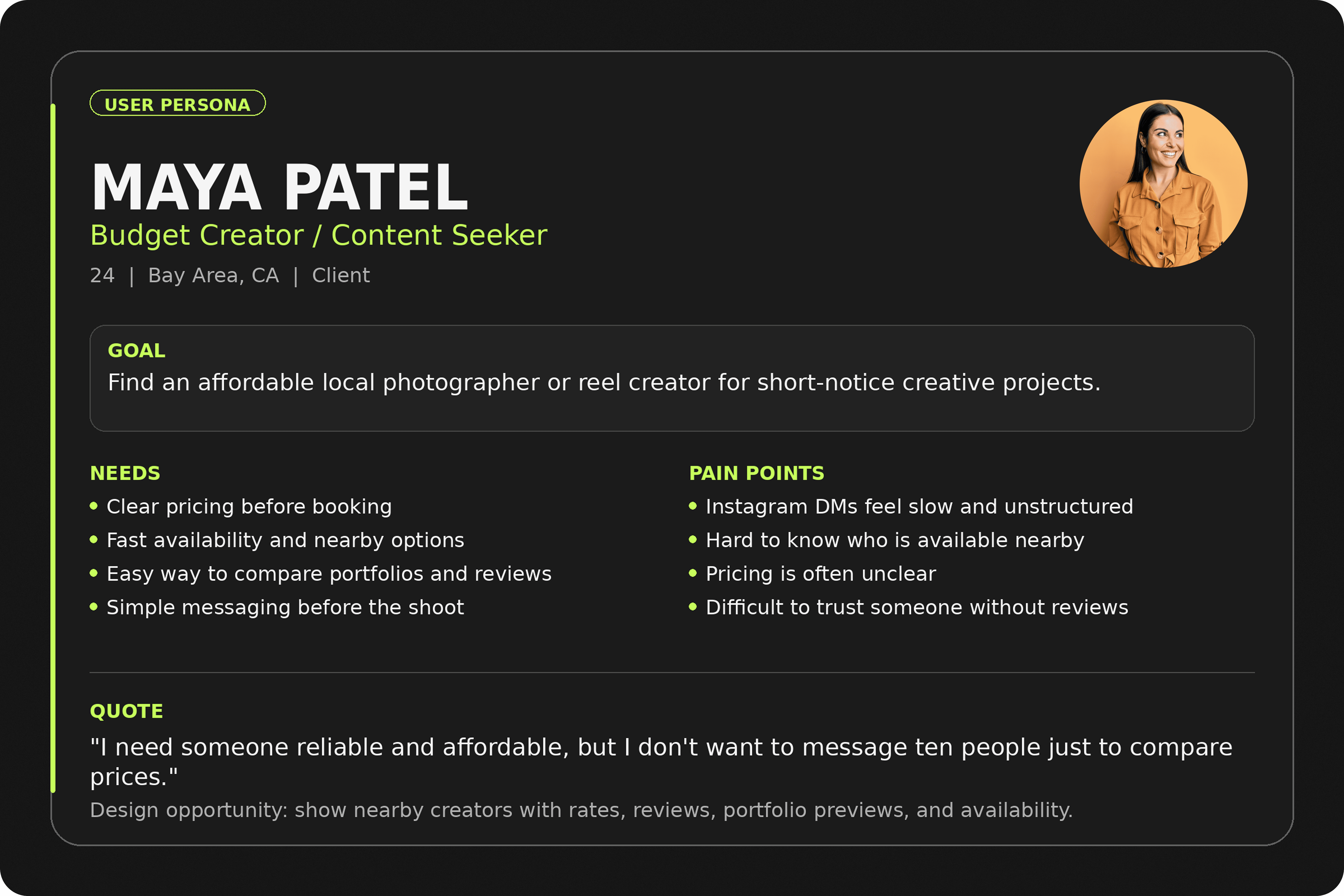
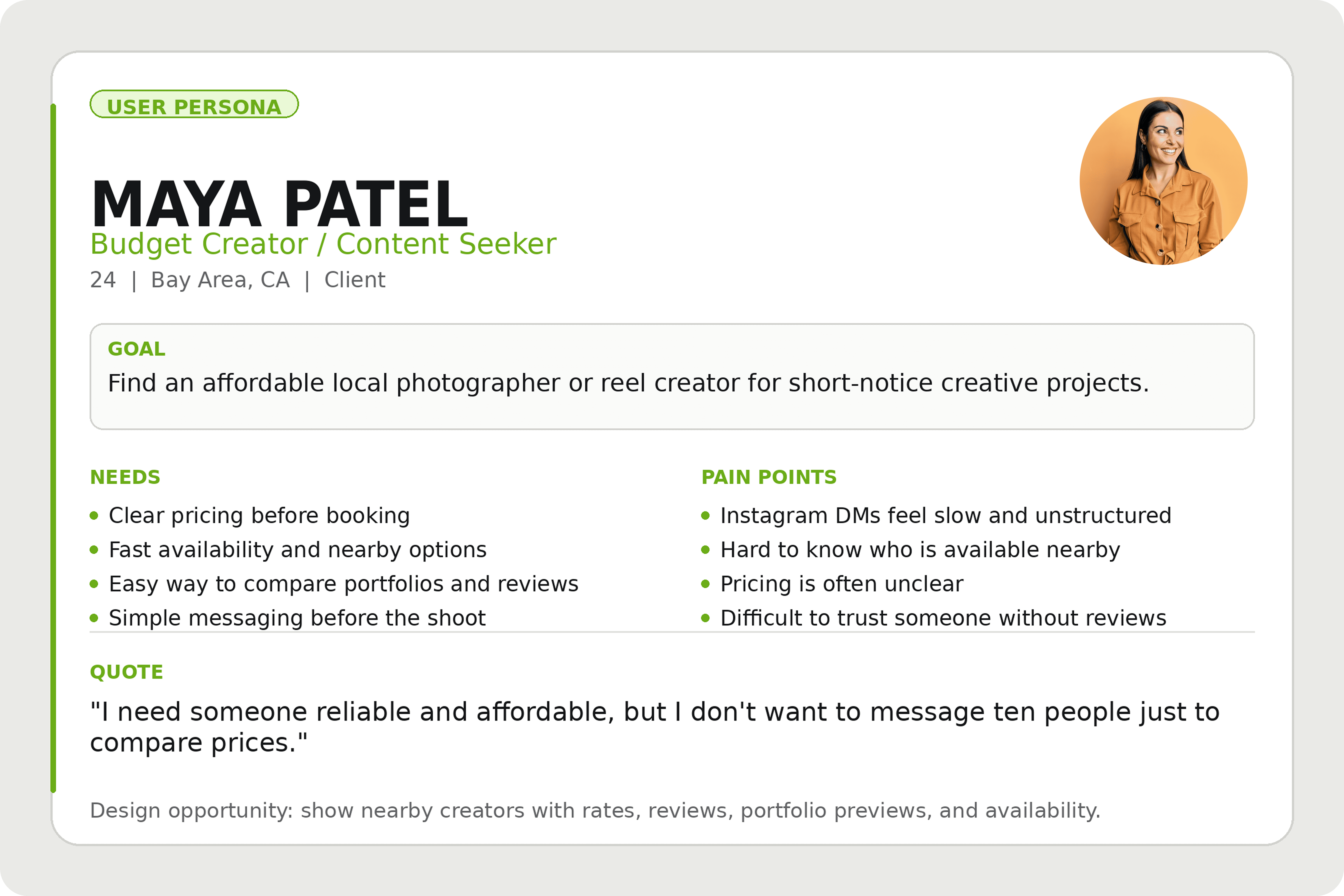
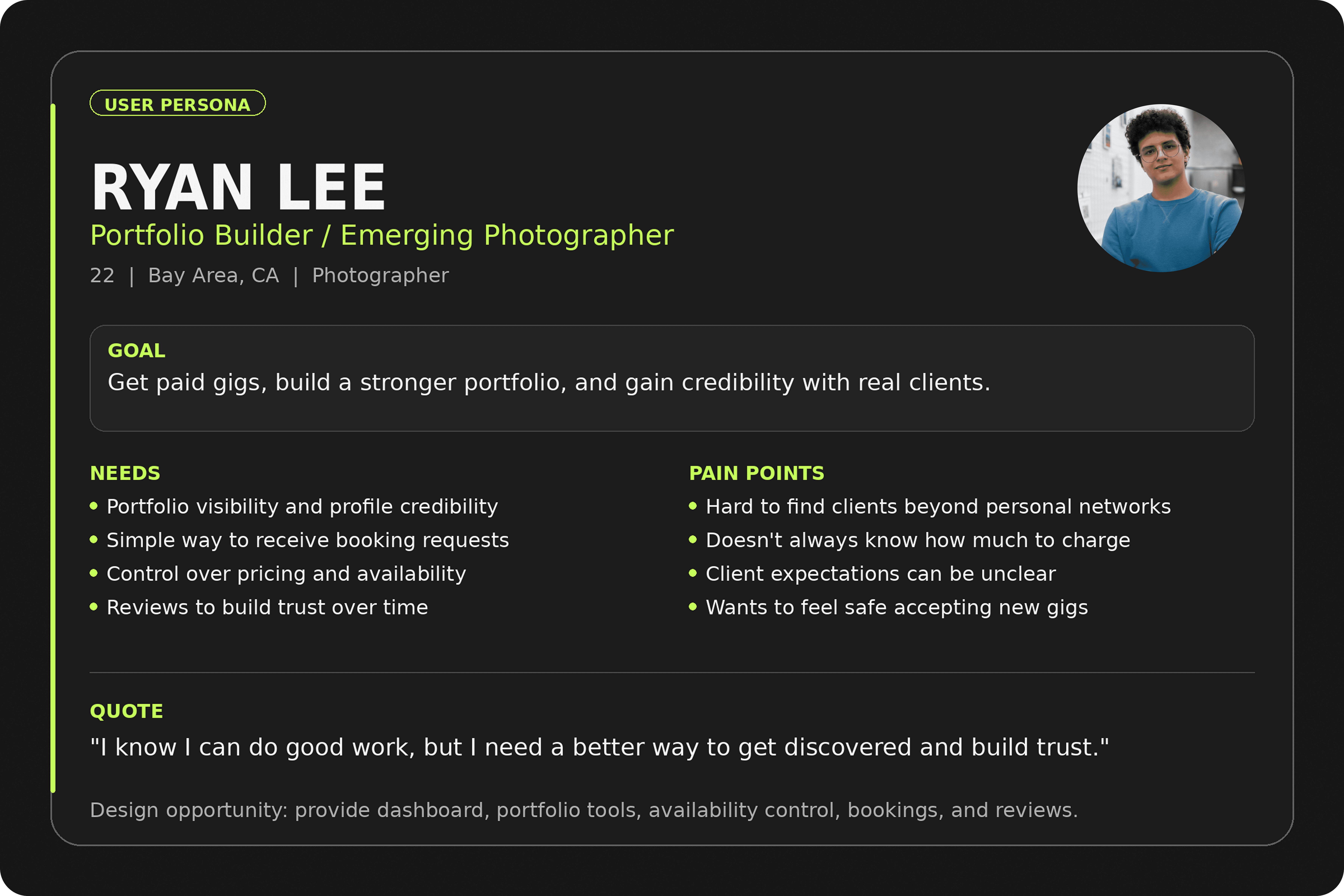
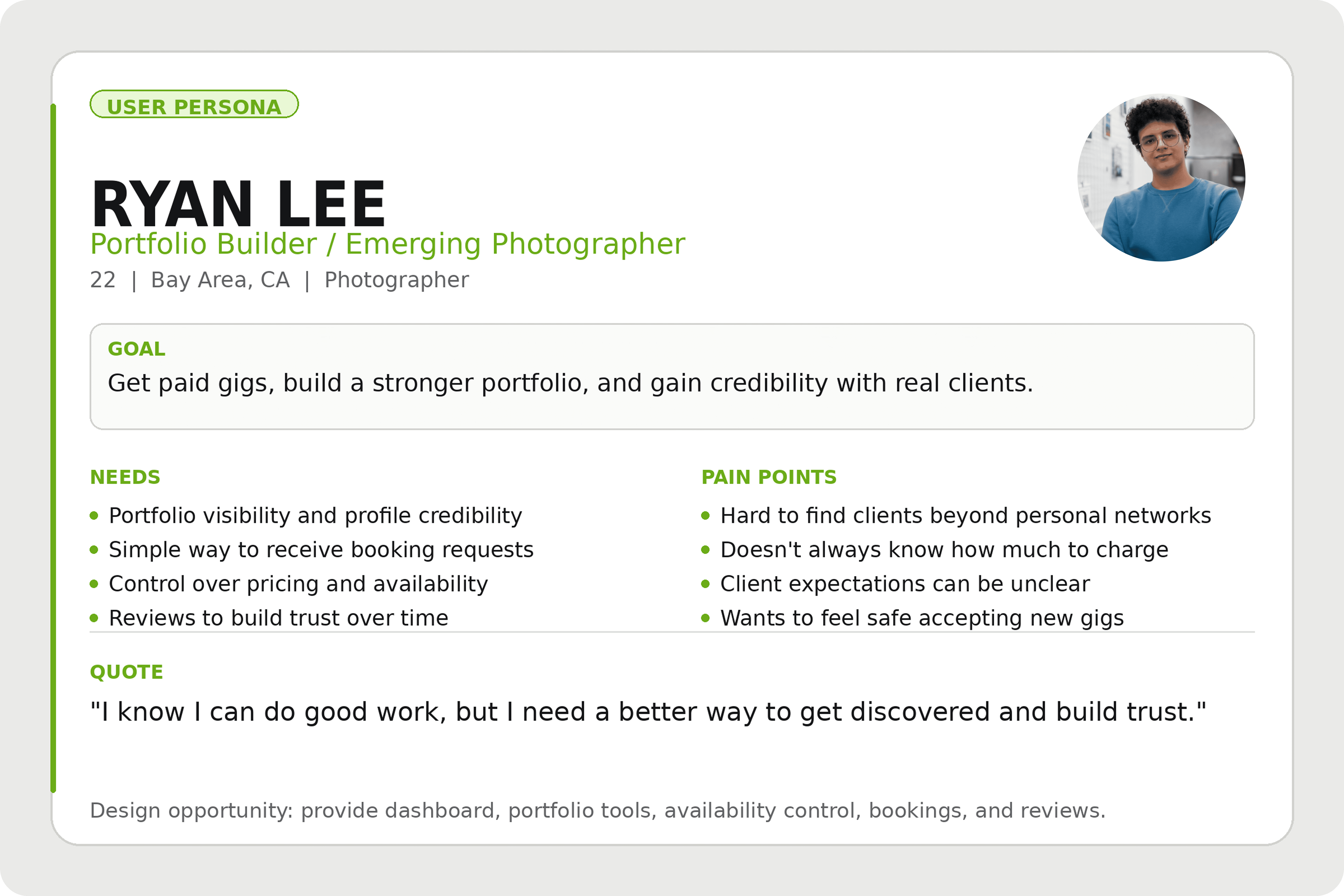
To make the research more specific, I created two core personas representing both sides of the marketplace: the client who needs affordable creative help, and the photographer who wants real opportunities to build experience and credibility.
Persona 1: Client
Persona 2: Photographer
Design Goals
Based on the research insights and user personas, I defined five design goals to guide StuCam’s product experience. These goals helped translate user needs into clear interaction and interface decisions.
Fast Local Discovery
Help clients quickly find nearby photographers or reel creators without searching across multiple platforms.
Trust Before Booking
Make portfolios, reviews, pricing, and availability visible early so clients feel confident before booking.
Clear Booking Flow
Create a simple path from discovery to profile viewing, booking, and messaging.
Photographer Growth
Give photographers tools to showcase work, manage availability, receive requests, and build credibility.
One App, Two Roles
Support both clients and photographers in one unified app with role-based experiences.
Mapping the Core Experience
After defining the research insights and personas, I mapped two primary user flows: one for clients looking to book photographers, and one for photographers managing their services. These flows helped clarify the key screens, actions, and decision points needed in the app.
Client Flow
Explore
→
Filter
→
View Profile
→
Book
→
Message
→
Review
Clients move from discovering nearby photographers to filtering options, reviewing profiles, booking a shoot, confirming details through messages, and leaving a review after the session.
Photographer Flow
Create Profile
→
Set Availability
→
Receive Request
→
Accept Booking
→
Manage Shoot
→
Build Reputation
Photographers move from setting up their profile and availability to receiving booking requests, coordinating with clients, managing shoots, and building credibility through completed work and reviews.
How this shaped the product
Mapping these flows helped define the app’s main navigation (Home, Feed, Bookings, Messages, Profile) and clarified the need for role-based experiences inside one unified app. For clients, the experience focuses on fast discovery and confident booking. For photographers, it focuses on visibility, availability control, booking management, and reputation building.
From Flows to Mid-Fidelity Wireframes
After mapping the core user flows, I translated the main actions into mid-fidelity screens in Figma. This stage helped me test layout, navigation, information hierarchy, and the separation between the client and photographer experiences before moving into high-fidelity design.
Client Experience
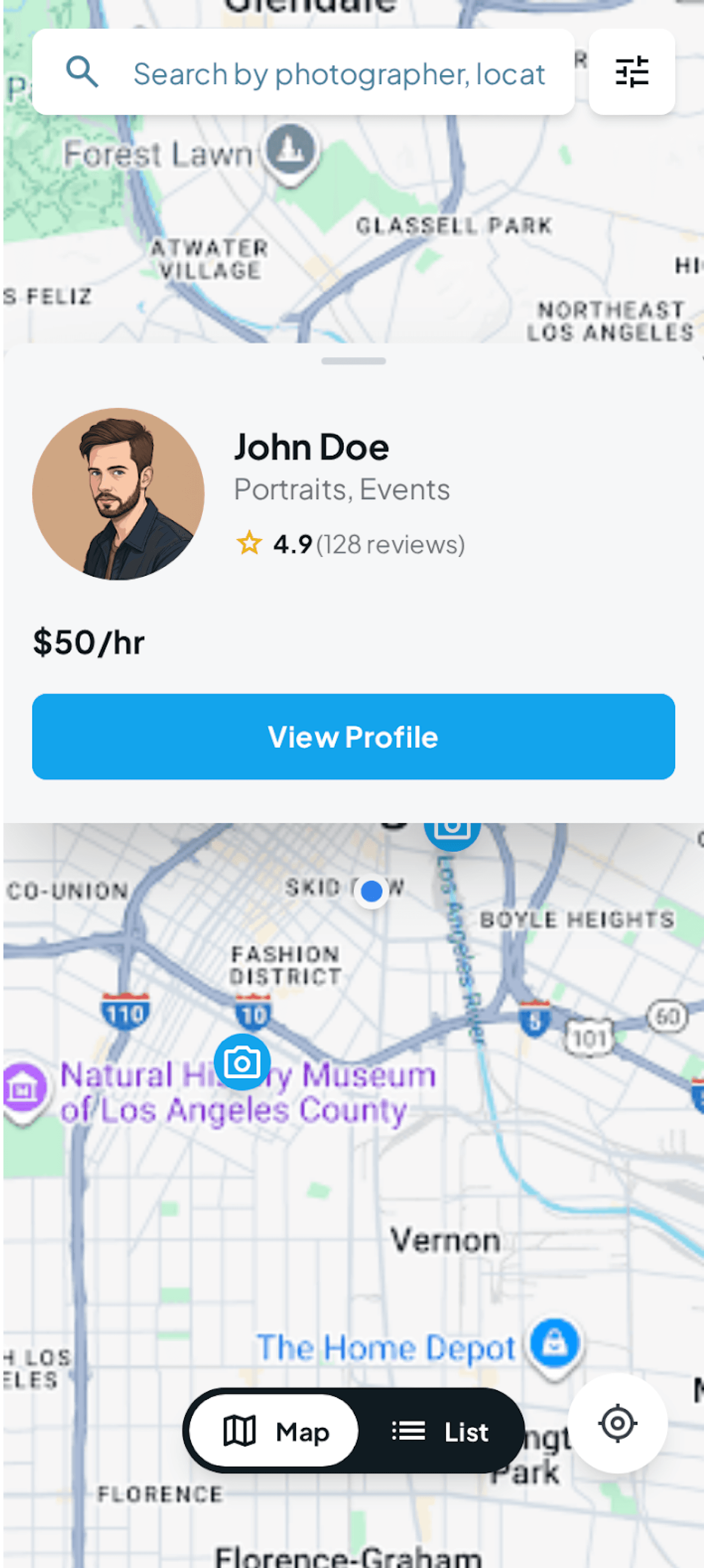
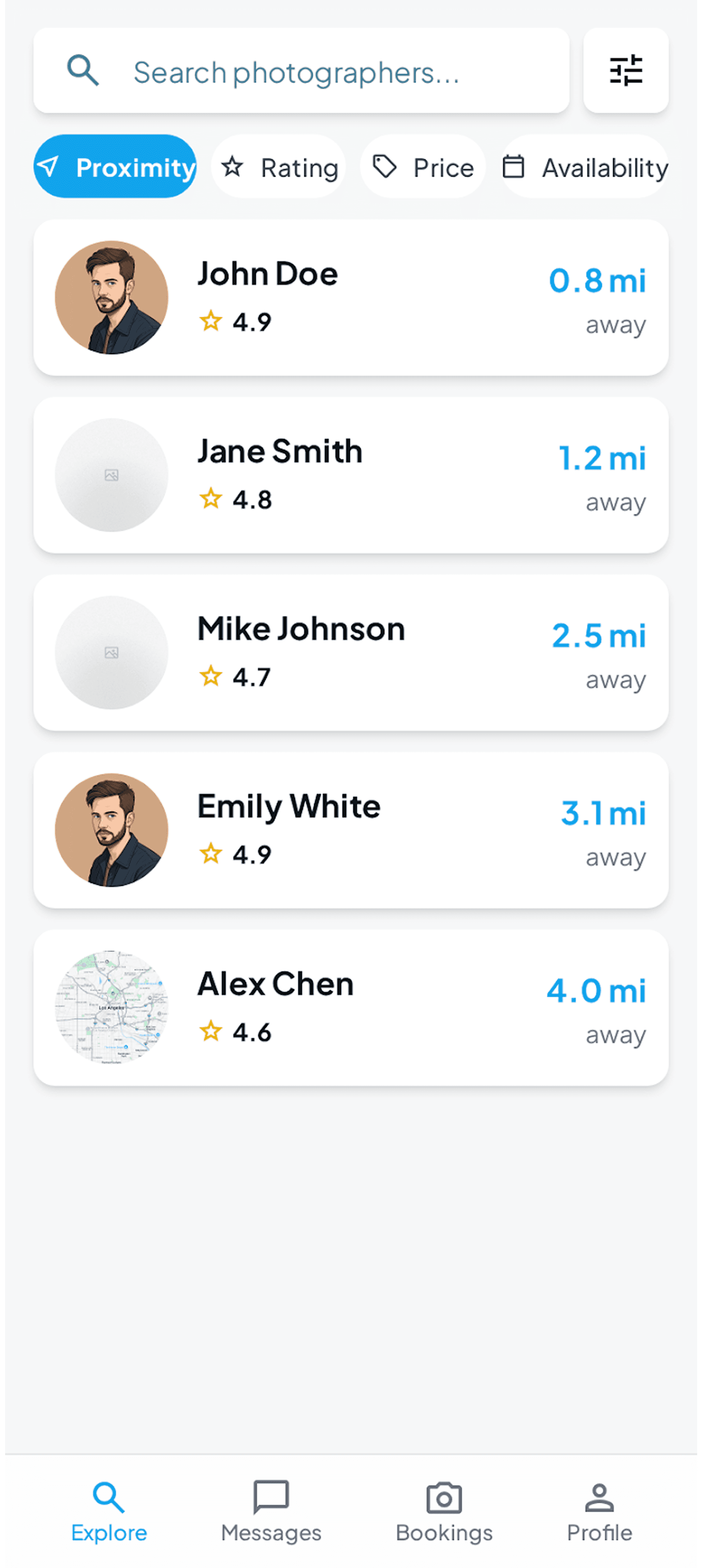
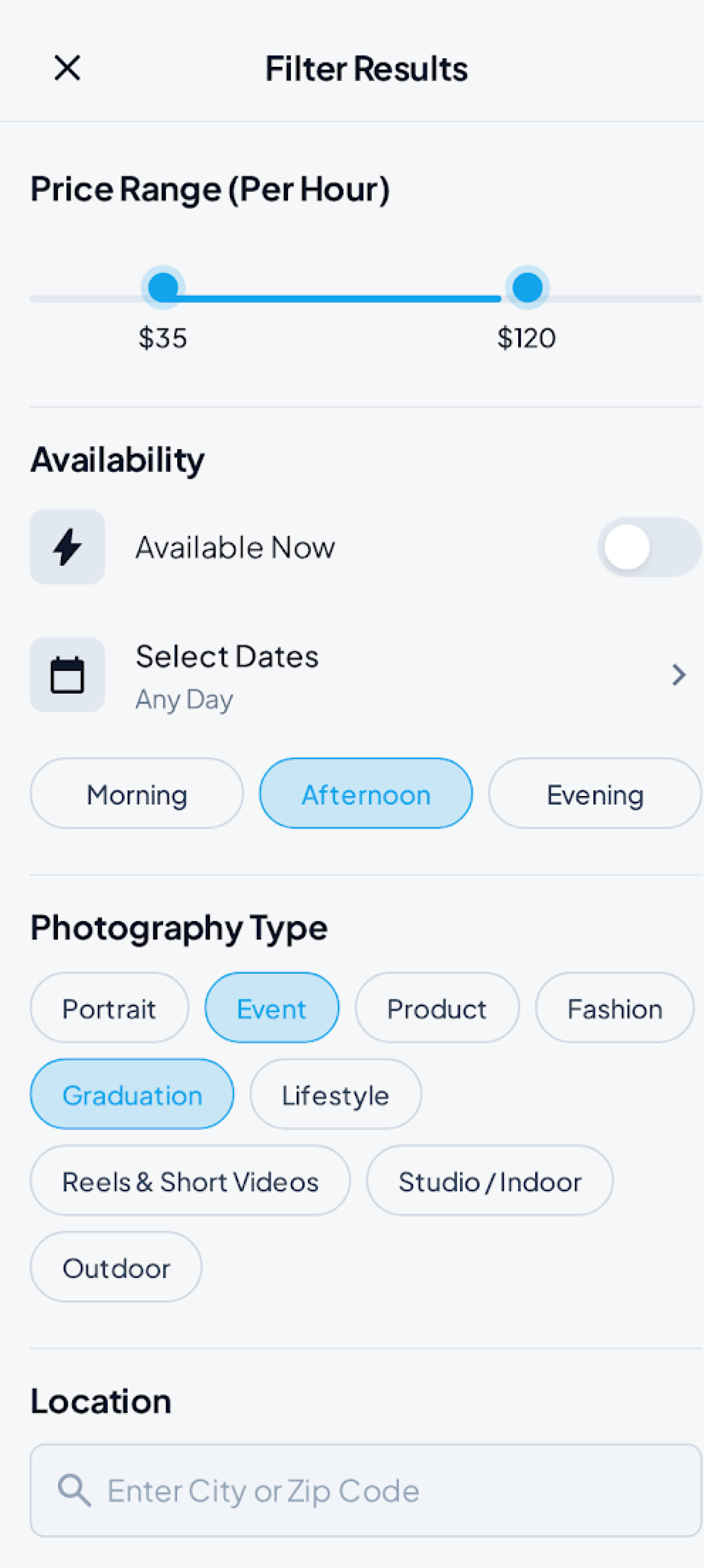
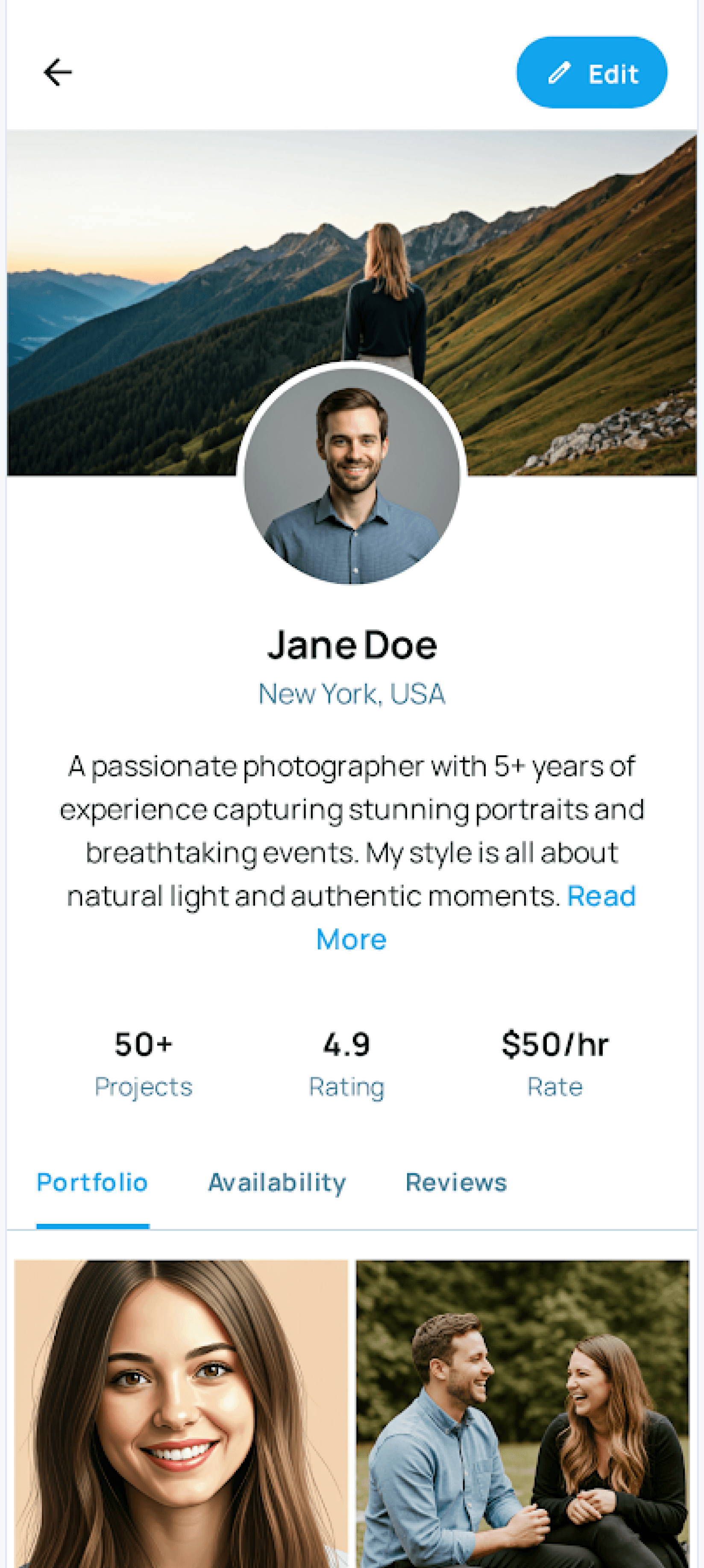
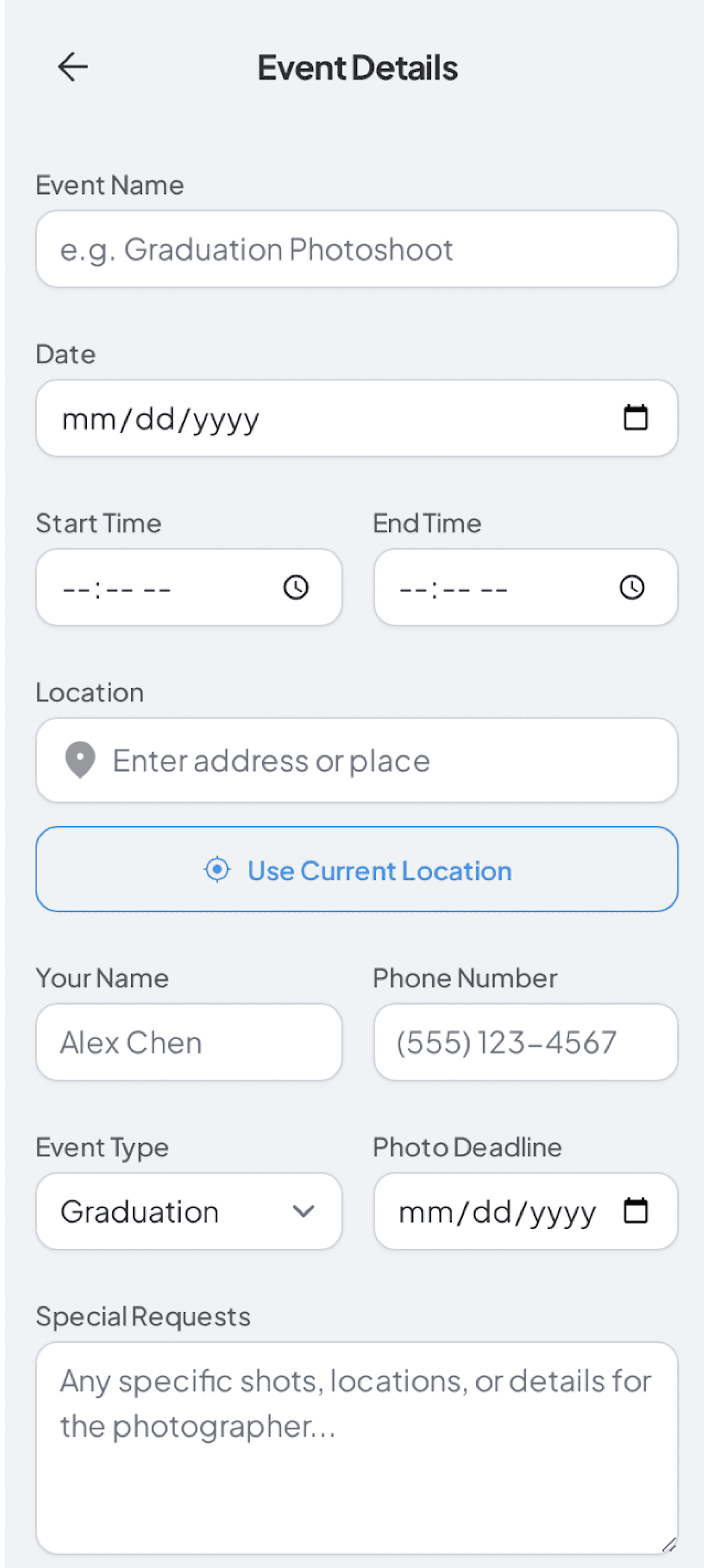
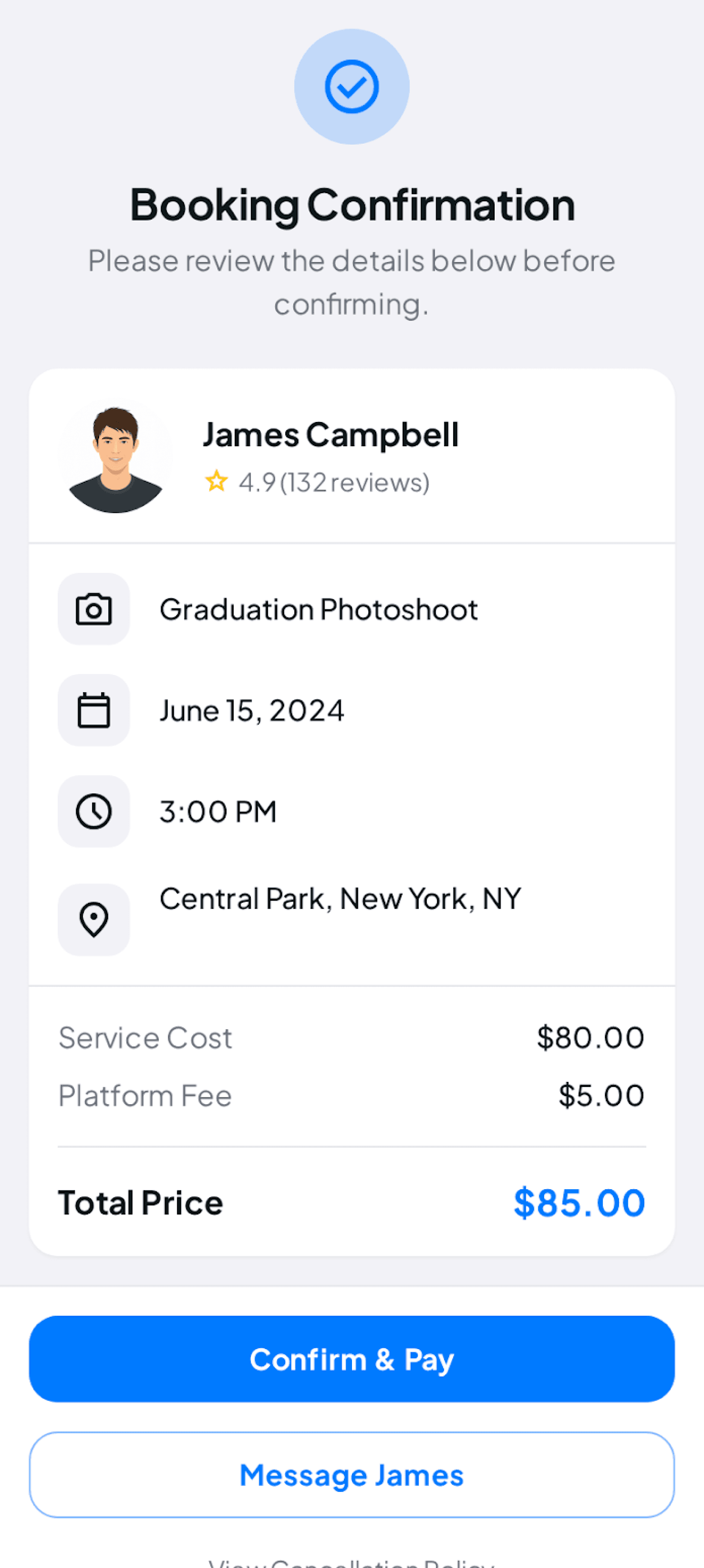
The client flow focuses on fast discovery, trust-building profile information, and a clear path from browsing to booking.
Photographer Experience
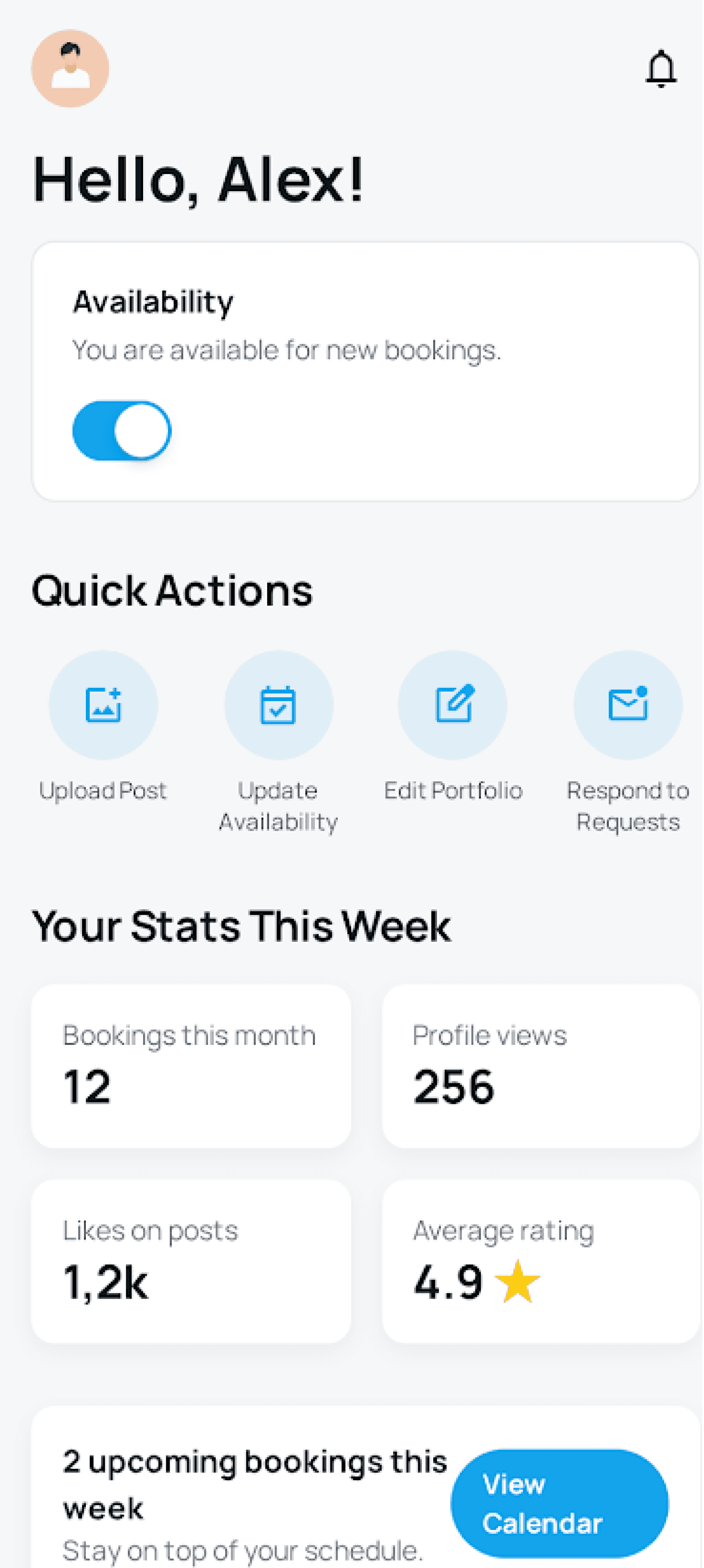

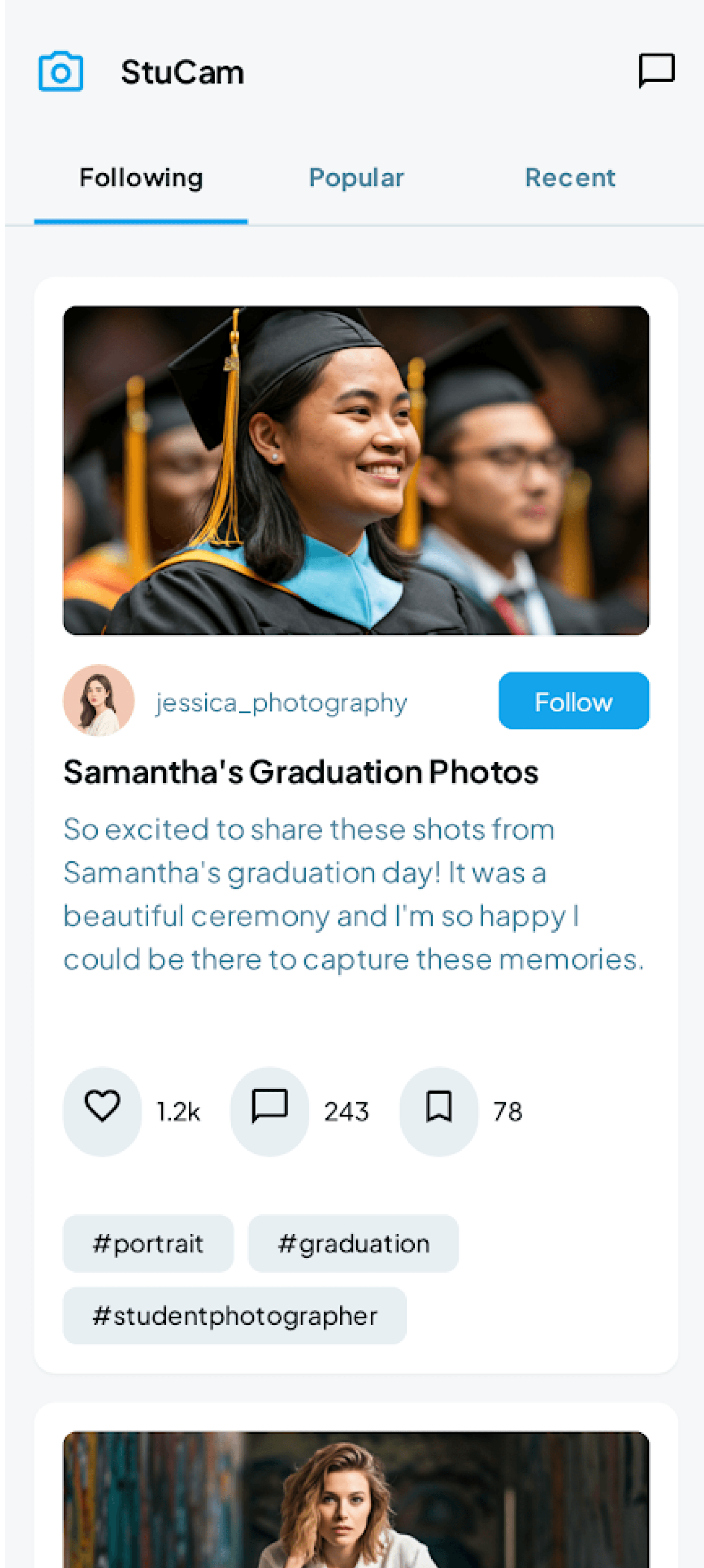
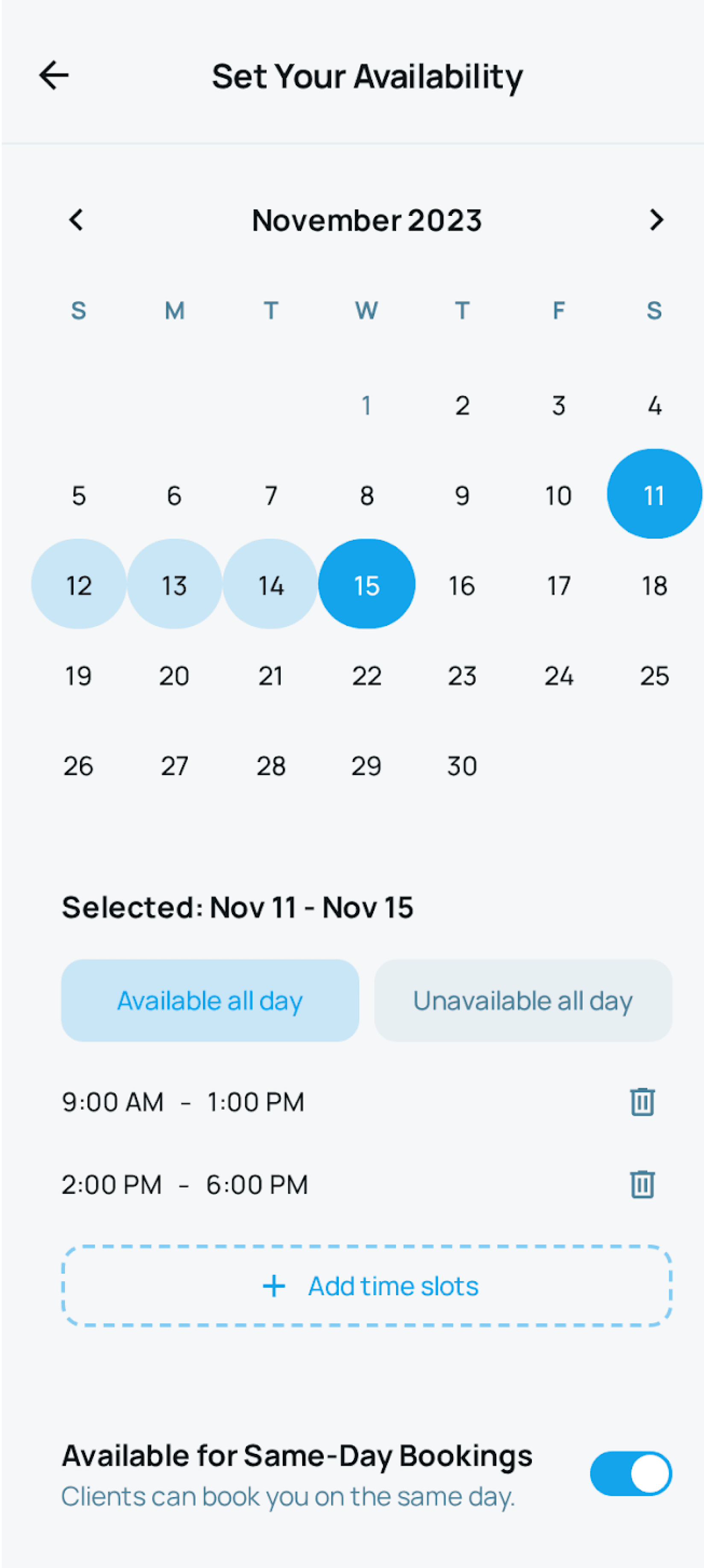
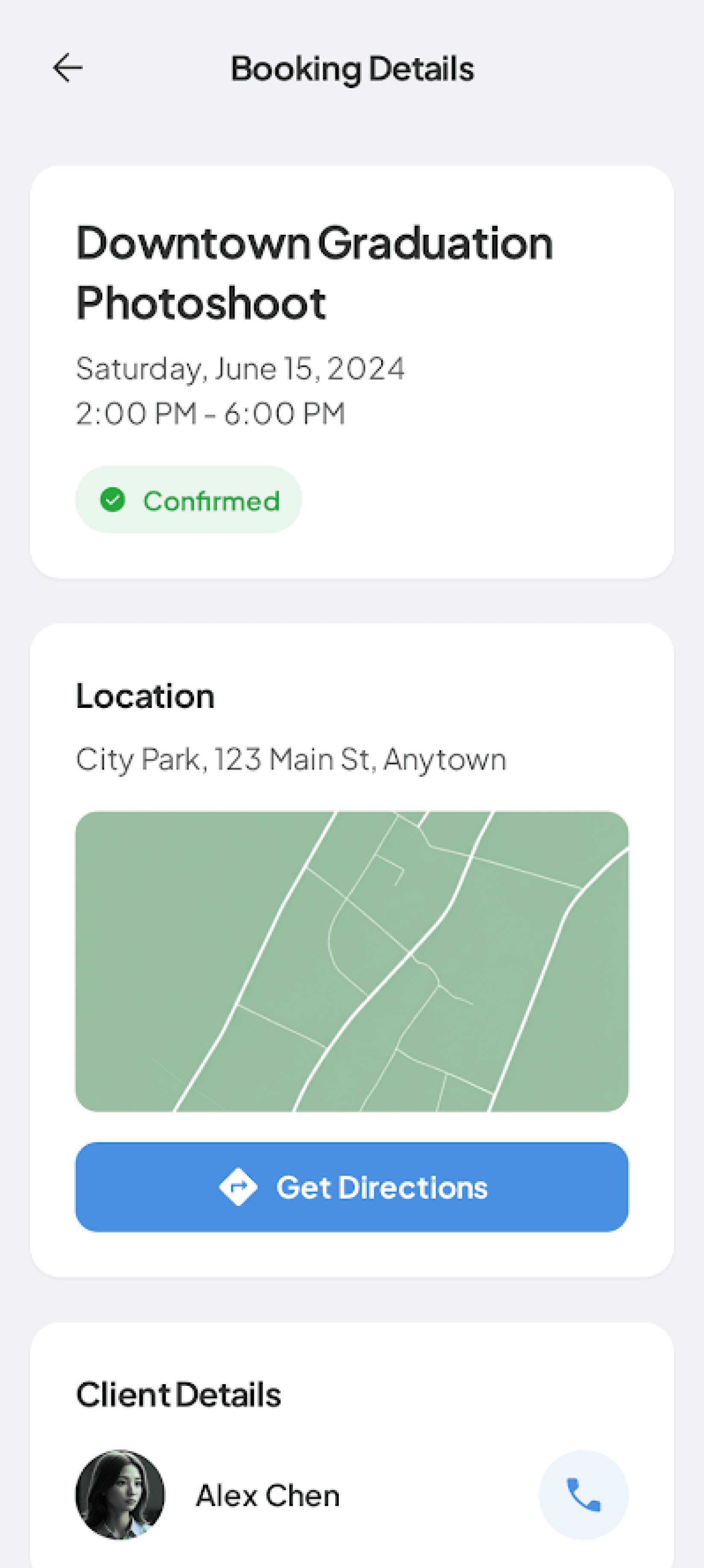

The photographer flow focuses on helping photographers manage visibility, availability, bookings, and communication.
High-Fidelity Design
After validating the structure through mid-fidelity screens, I moved into high-fidelity design to refine the visual language, interaction details, and role-based experience. The final UI focuses on making StuCam feel clear, trustworthy, and easy to use for both clients and photographers.
Client Experience
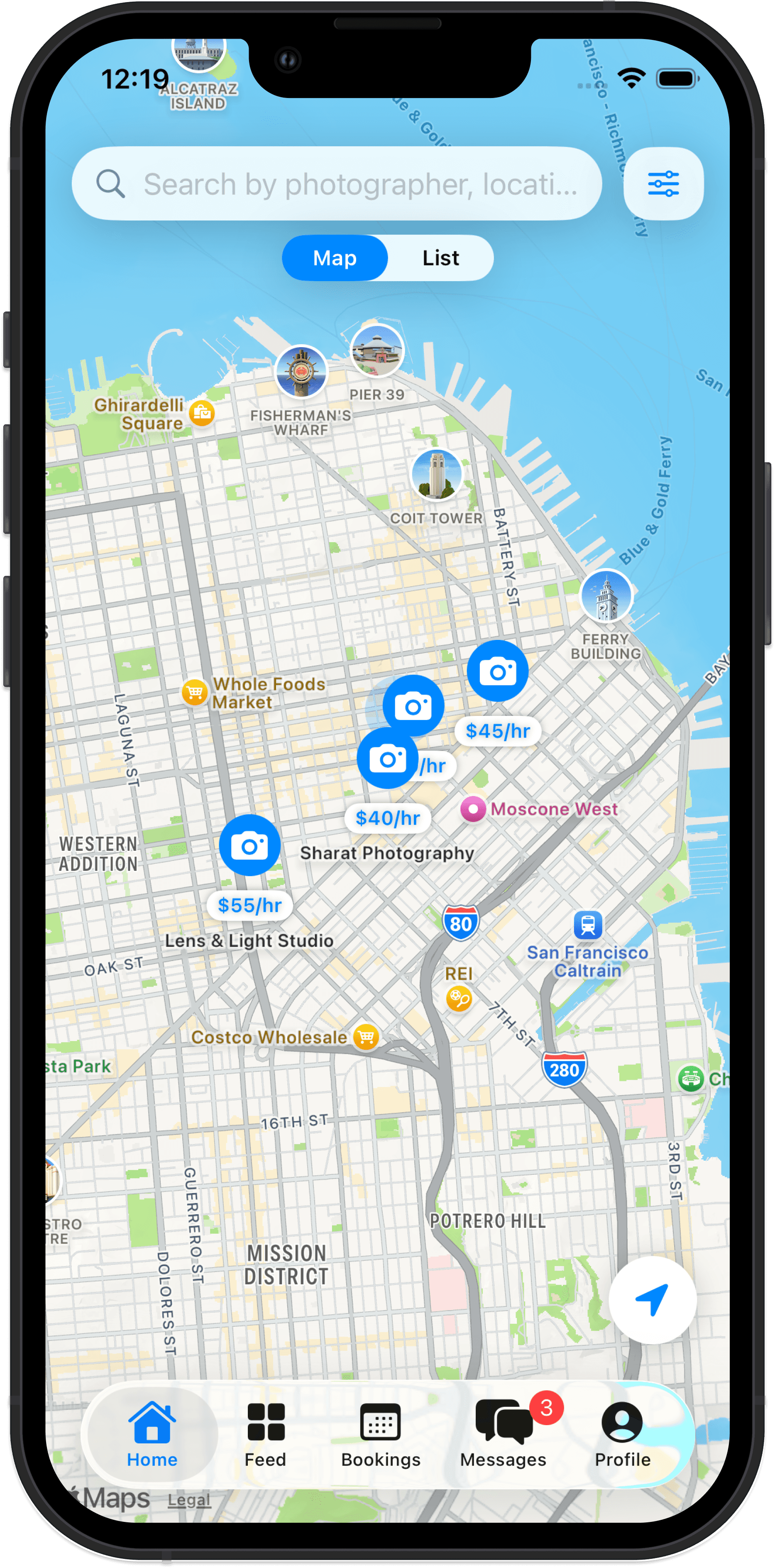

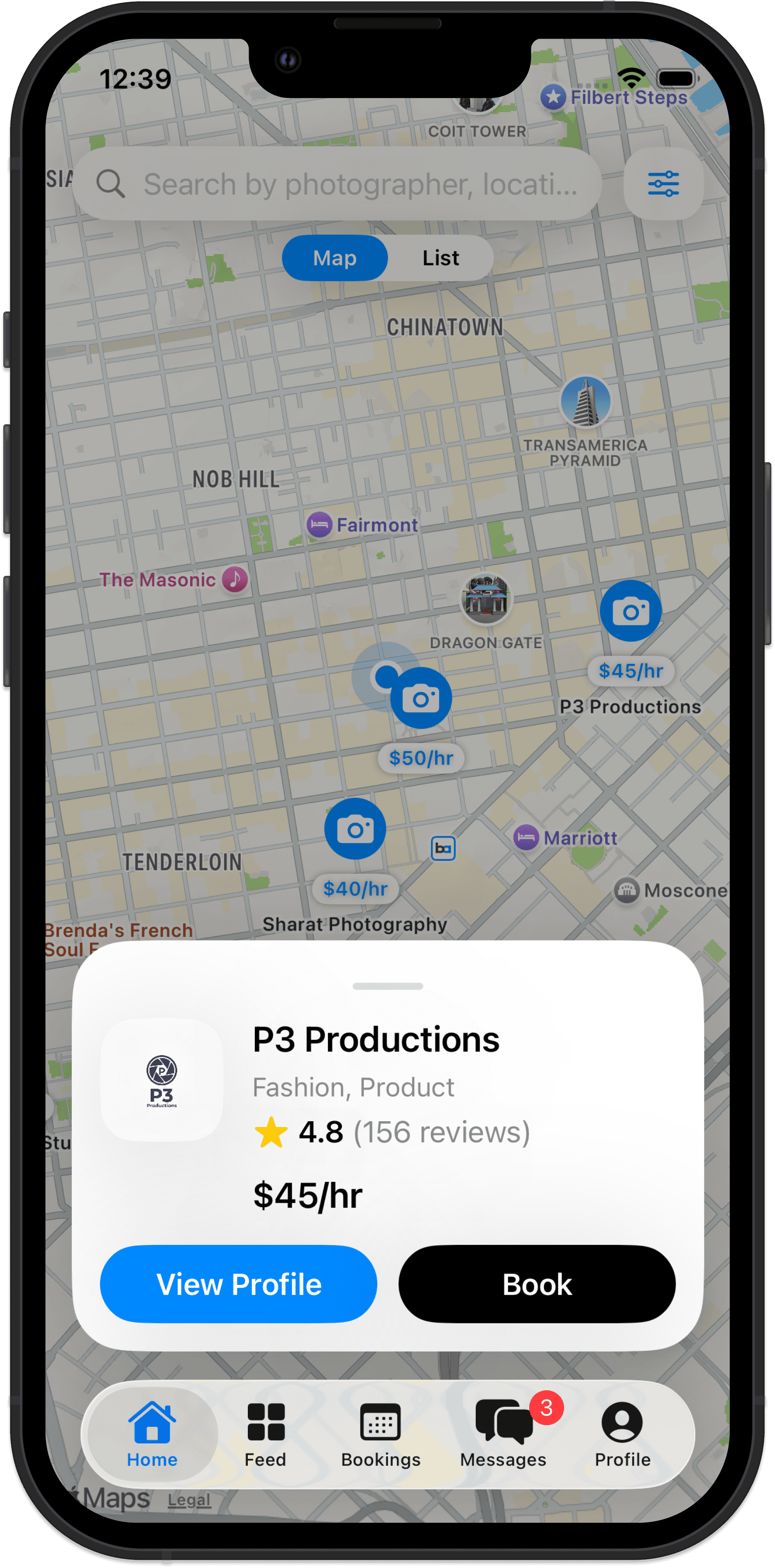
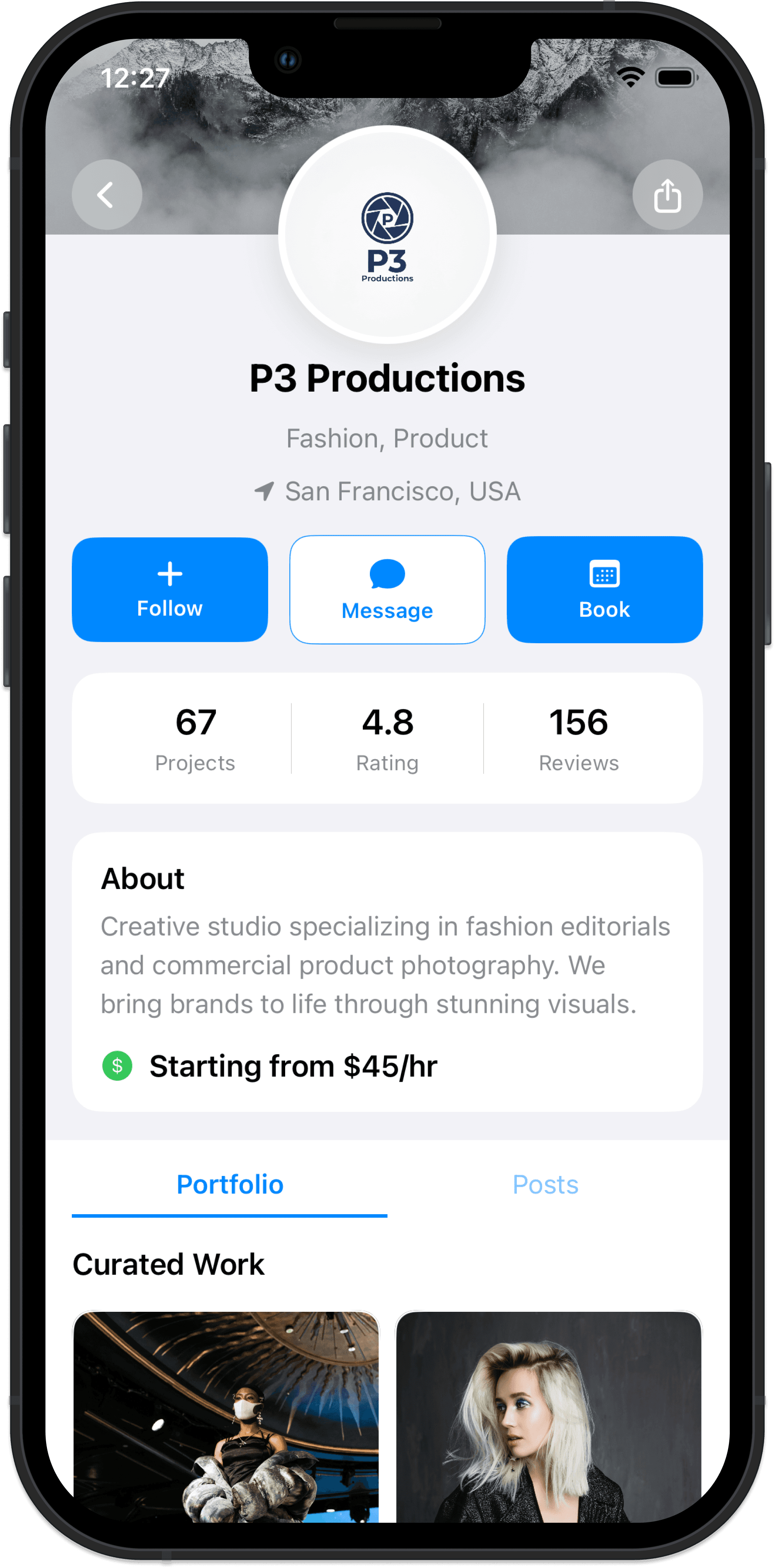

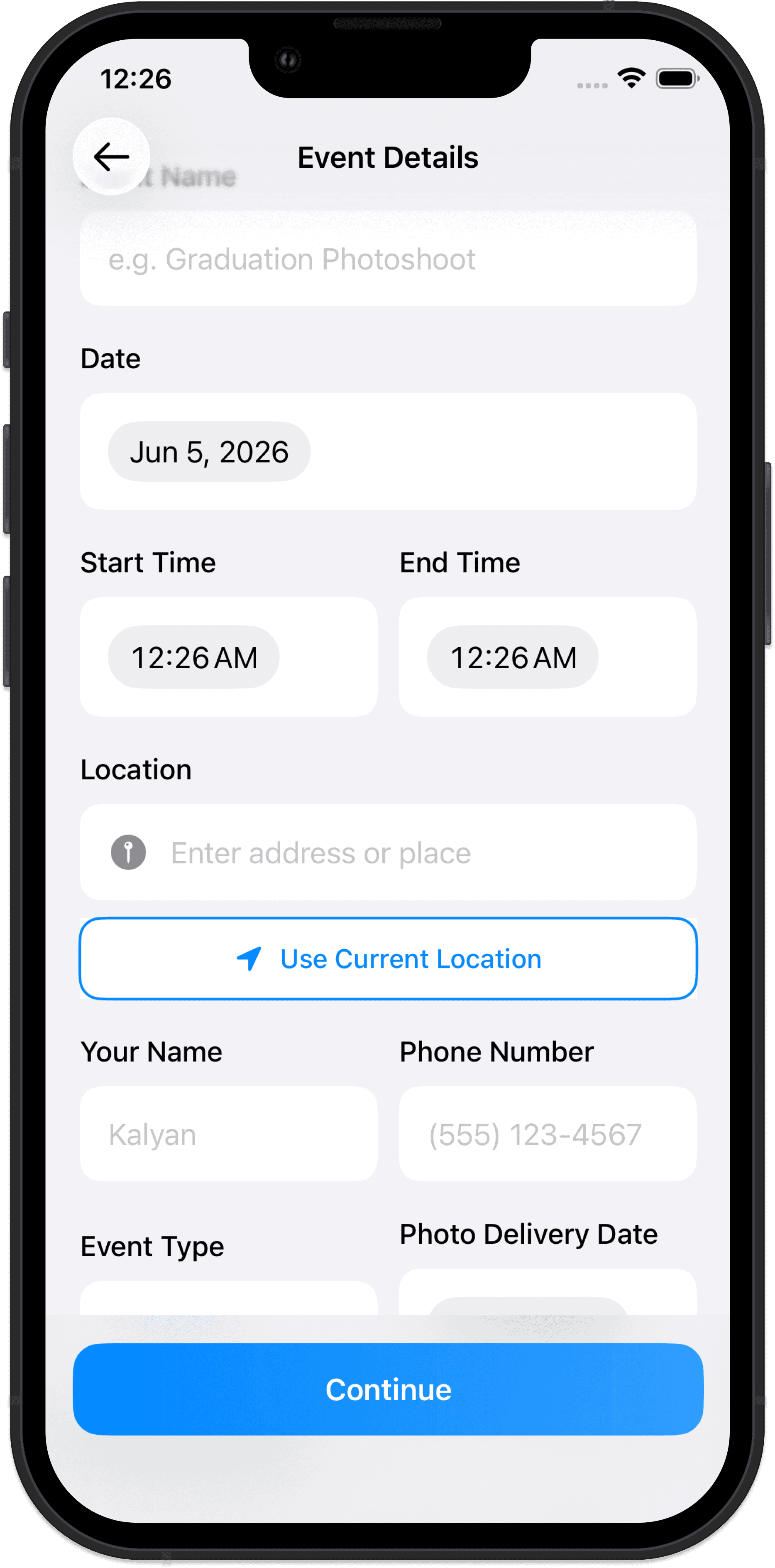
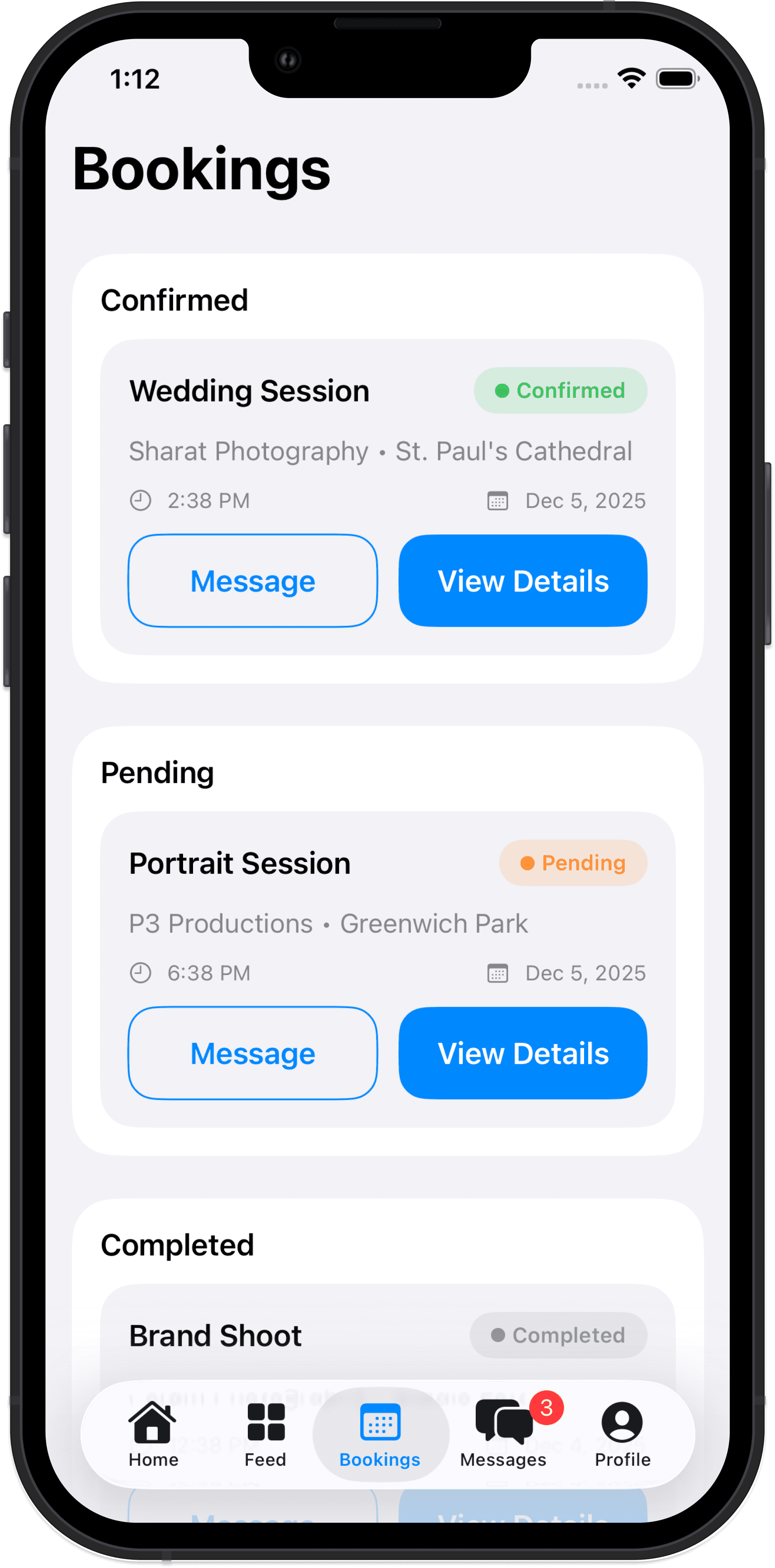

The client experience was refined to make discovery faster, trust signals clearer, and booking easier to complete.
Photographer Experience


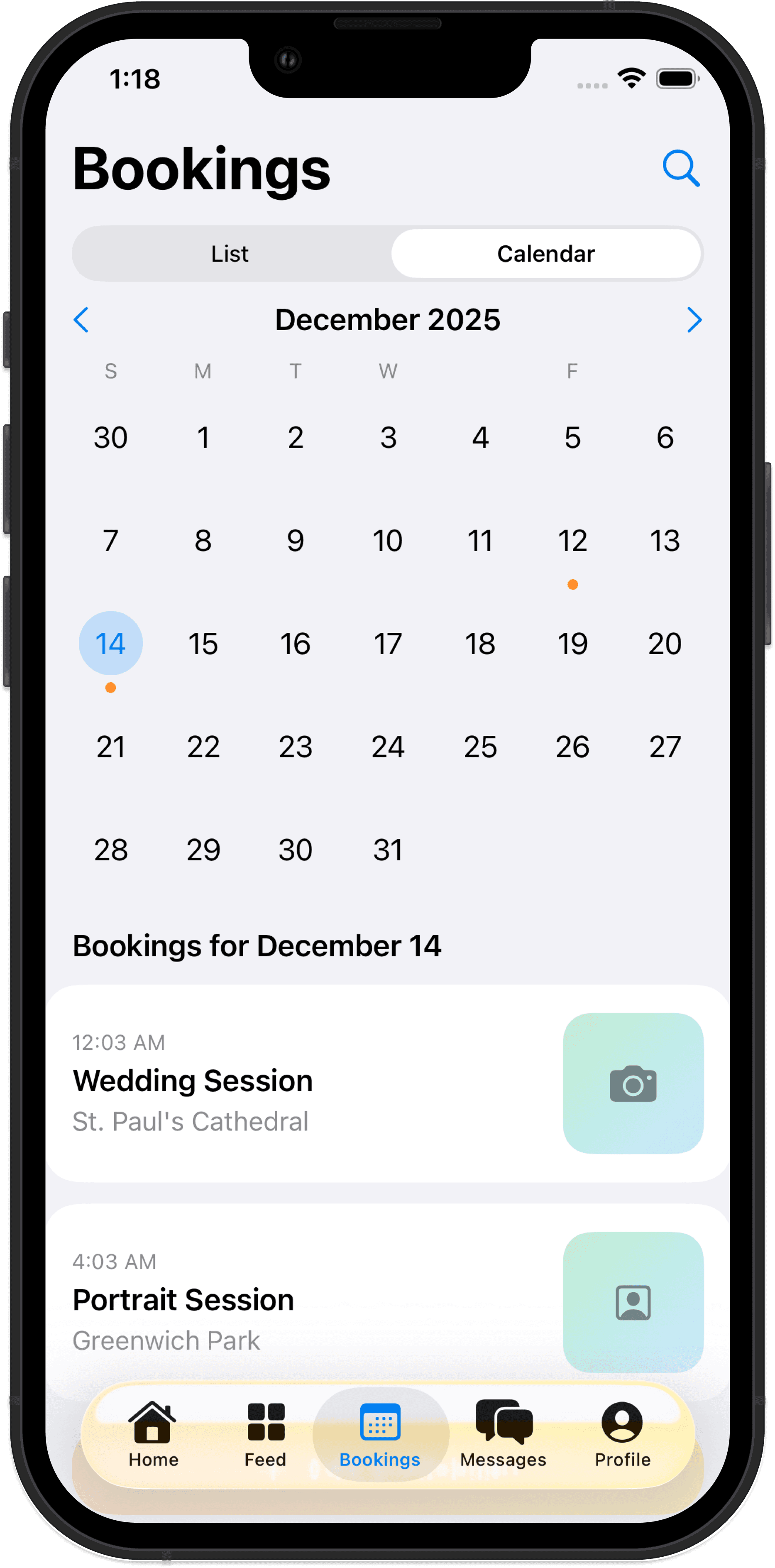
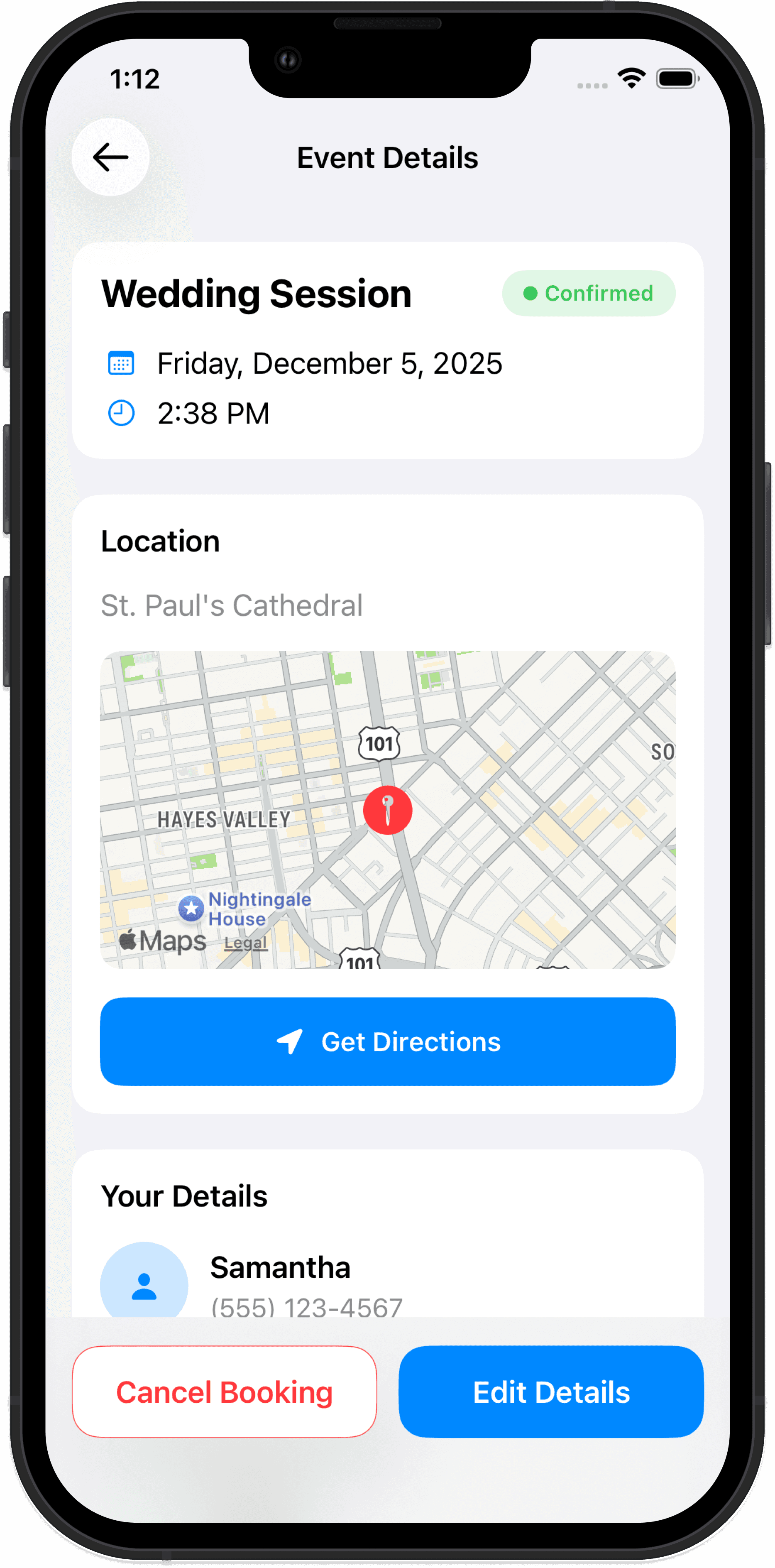
The photographer experience was refined to support availability control, booking management, portfolio visibility, and client communication.
Prototype Build with Cursor + Xcode
After exploring the mid-fidelity structure, I moved into Xcode to build the high-fidelity version of StuCam using SwiftUI. Instead of only creating static screens, I translated the product flow into a working iOS prototype with role-based screens, navigation, and simulated app states.
This stage helped me understand how the design worked beyond Figma including spacing, responsiveness, button states, screen transitions, and how users would move through the experience on an actual device.

SwiftUI implementation in Xcode showing the StuCam prototype running with simulated app data.
Figma concepts
→
Cursor/Vibe coding
→
SwiftUI components
→
Xcode prototype
Iterations & Learnings
Throughout the project, I refined StuCam based on research, feedback, and prototype decisions. These iterations helped make the product more focused, easier to use, and more aligned with the needs of both clients and photographers.
01
Narrowing the Scope
I refined the product direction to focus specifically on photography and reel creators instead of a broader service marketplace.
02
One App, Two Roles
I chose a unified app with role-based experiences instead of creating separate apps for clients and photographers.
03
Booking-First Messaging
I prioritized booking-related conversations because they are more urgent and directly tied to confirmed shoots.
04
Portfolio vs Posts
I separated curated portfolio work from casual feed posts so clients can make booking decisions more confidently.
05
Local Discovery
I added location-based discovery through map/list views and the Near You feed to support quick, nearby creative needs.
What I Learned
• Clear scope creates stronger product decisions
• Trust signals are essential in marketplace design
• Pricing and availability need to appear early
• Beginner photographers need structure, not just exposure
• Building in Xcode helped me understand interaction details beyond static design
Final Reflection
StuCam helped me explore how product design can support both sides of a creative marketplace. For clients, the app makes it easier to find affordable, local, and trustworthy photographers. For photographers, it creates a structured way to gain visibility, manage bookings, and build credibility through real work.
This project let me practice the full product design process end-to-end: identifying a real problem, conducting research, synthesizing insights, building user flows, making key design decisions, and translating the prototype into an early SwiftUI build. More importantly, it taught me how product design can support creative communities by turning informal, messy interactions into clear and meaningful experiences.
More Projects


Tools:
UI / UX Design
StuCam
StuCam is a local-first photography booking app designed to make finding and booking nearby photographers simpler, clearer, and more trustworthy.
Type :
Mobile App
Timeline :
Aug – Dec 2025
Context :
Master's Capstone
Role :
Product Design
Project Background & Personal Journey
StuCam started from a real-life moment when I met a singer on a bus who needed someone to shoot short videos/reels of her performance, but she did not know where to find an affordable and reliable local videographer. That moment made me realize there is a gap between people who need quick creative help and photographers or creators who are looking for real paid opportunities.
StuCam explores how a local-first booking platform can make it easier for clients to discover, compare, and book nearby photographers through portfolios, pricing, availability, and in-app messaging.
The Problem
Hiring a photographer should feel simple, but the current process is often fragmented, informal, and difficult to trust. Clients usually rely on Instagram DMs, word-of-mouth, or Facebook groups, which can make it hard to compare pricing, availability, style, and reliability in one place.
At the same time, beginner and emerging photographers often have the skills to take on real projects, but struggle to find paid gigs, build credibility, and communicate their value professionally.
Problem Statement:
There is no dedicated, local-first platform that helps clients and emerging photographers connect efficiently, affordably, and safely while providing the trust signals needed to feel confident before booking.
Research & Insights
I researched both sides of the marketplace — clients looking for photography services, and photographers trying to get booked.
Research Approach
Observation
Real-life problem discovery
Informal Conversations
Client + photographer needs
Interview Planning
Trust, pricing, safety, availability
Competitor Review
Instagram, Fiverr, Upwork, Snappr
Key Insights
• Trust comes first — clients need proof before booking someone new.
• Availability matters — users often need someone available soon, not the “best” option.
• Pricing should be clear — visible rates reduce awkward negotiation.
• Beginners need structure — new photographers need tools that help them look credible.
• Local discovery is key — distance and nearby availability shape booking decisions.
User Archetypes
Based on the research, I identified four key user archetypes that shaped the design direction for StuCam. These archetypes helped me understand the different motivations, pain points, and expectations across both sides of the marketplace.
Portfolio Builder
A beginner photographer who wants real-world experience, paid gigs, and portfolio credibility.
Needs: visibility, trust, client opportunities
Pain point: people hesitate to book them without proof of experience
Opportunity: curated portfolio, reviews, and profile credibility
Budget Creator
A student, artist, or small business owner who needs affordable photography or reel content.
Needs: clear pricing, reliable options, simple booking
Pain point: professional services feel too expensive or hard to compare
Opportunity: transparent rates, filters, and local photographer discovery
Event Improviser
A performer, musician, or creator who needs someone available quickly for a shoot or event.
Needs: fast availability, location-based discovery, quick communication
Pain point: last-minute creative needs are hard to solve through DMs
Opportunity: availability toggle, Near You feed, and instant messaging
Side-Hustler
A photographer who wants flexible paid work while balancing school, work, or other commitments.
Needs: flexible scheduling, booking control, income opportunities
Pain point: inconsistent client flow and unclear expectations
Opportunity: booking dashboard, availability calendar, and structured client requests
User Personas
To make the research more specific, I created two core personas representing both sides of the marketplace: the client who needs affordable creative help, and the photographer who wants real opportunities to build experience and credibility.
Persona 1: Client
Persona 2: Photographer
Design Goals
Based on the research insights and user personas, I defined five design goals to guide StuCam’s product experience. These goals helped translate user needs into clear interaction and interface decisions.
Fast Local Discovery
Help clients quickly find nearby photographers or reel creators without searching across multiple platforms.
Trust Before Booking
Make portfolios, reviews, pricing, and availability visible early so clients feel confident before booking.
Clear Booking Flow
Create a simple path from discovery to profile viewing, booking, and messaging.
Photographer Growth
Give photographers tools to showcase work, manage availability, receive requests, and build credibility.
One App, Two Roles
Support both clients and photographers in one unified app with role-based experiences.
Mapping the Core Experience
After defining the research insights and personas, I mapped two primary user flows: one for clients looking to book photographers, and one for photographers managing their services. These flows helped clarify the key screens, actions, and decision points needed in the app.
Client Flow
Explore
→
Filter
→
View Profile
→
Book
→
Message
→
Review
Clients move from discovering nearby photographers to filtering options, reviewing profiles, booking a shoot, confirming details through messages, and leaving a review after the session.
Photographer Flow
Create Profile
→
Set Availability
→
Receive Request
→
Accept Booking
→
Manage Shoot
→
Build Reputation
Photographers move from setting up their profile and availability to receiving booking requests, coordinating with clients, managing shoots, and building credibility through completed work and reviews.
How this shaped the product
Mapping these flows helped define the app’s main navigation (Home, Feed, Bookings, Messages, Profile) and clarified the need for role-based experiences inside one unified app. For clients, the experience focuses on fast discovery and confident booking. For photographers, it focuses on visibility, availability control, booking management, and reputation building.
From Flows to Mid-Fidelity Wireframes
After mapping the core user flows, I translated the main actions into mid-fidelity screens in Figma. This stage helped me test layout, navigation, information hierarchy, and the separation between the client and photographer experiences before moving into high-fidelity design.
Client Experience
The client flow focuses on fast discovery, trust-building profile information, and a clear path from browsing to booking.
Photographer Experience
The photographer flow focuses on helping photographers manage visibility, availability, bookings, and communication.
High-Fidelity Design
After validating the structure through mid-fidelity screens, I moved into high-fidelity design to refine the visual language, interaction details, and role-based experience. The final UI focuses on making StuCam feel clear, trustworthy, and easy to use for both clients and photographers.
Client Experience
The client experience was refined to make discovery faster, trust signals clearer, and booking easier to complete.
Photographer Experience
The photographer experience was refined to support availability control, booking management, portfolio visibility, and client communication.
Prototype Build with Cursor + Xcode
After exploring the mid-fidelity structure, I moved into Xcode to build the high-fidelity version of StuCam using SwiftUI. Instead of only creating static screens, I translated the product flow into a working iOS prototype with role-based screens, navigation, and simulated app states.
This stage helped me understand how the design worked beyond Figma including spacing, responsiveness, button states, screen transitions, and how users would move through the experience on an actual device.
SwiftUI implementation in Xcode showing the StuCam prototype running with simulated app data.
Figma concepts
→
Cursor/Vibe coding
→
SwiftUI components
→
Xcode prototype
Iterations & Learnings
Throughout the project, I refined StuCam based on research, feedback, and prototype decisions. These iterations helped make the product more focused, easier to use, and more aligned with the needs of both clients and photographers.
01
Narrowing the Scope
I refined the product direction to focus specifically on photography and reel creators instead of a broader service marketplace.
02
One App, Two Roles
I chose a unified app with role-based experiences instead of creating separate apps for clients and photographers.
03
Booking-First Messaging
I prioritized booking-related conversations because they are more urgent and directly tied to confirmed shoots.
04
Portfolio vs Posts
I separated curated portfolio work from casual feed posts so clients can make booking decisions more confidently.
05
Local Discovery
I added location-based discovery through map/list views and the Near You feed to support quick, nearby creative needs.
What I Learned
• Clear scope creates stronger product decisions
• Trust signals are essential in marketplace design
• Pricing and availability need to appear early
• Beginner photographers need structure, not just exposure
• Building in Xcode helped me understand interaction details beyond static design
Final Reflection
StuCam helped me explore how product design can support both sides of a creative marketplace. For clients, the app makes it easier to find affordable, local, and trustworthy photographers. For photographers, it creates a structured way to gain visibility, manage bookings, and build credibility through real work.
This project let me practice the full product design process end-to-end: identifying a real problem, conducting research, synthesizing insights, building user flows, making key design decisions, and translating the prototype into an early SwiftUI build. More importantly, it taught me how product design can support creative communities by turning informal, messy interactions into clear and meaningful experiences.
More Projects
Tools:
UI / UX Design
StuCam
StuCam is a local-first photography booking app designed to make finding and booking nearby photographers simpler, clearer, and more trustworthy.
Type :
Mobile App
Timeline :
Aug – Dec 2025
Context :
Master's Capstone
Role :
Product Design
Project Background & Personal Journey
StuCam started from a real-life moment when I met a singer on a bus who needed someone to shoot short videos/reels of her performance, but she did not know where to find an affordable and reliable local videographer. That moment made me realize there is a gap between people who need quick creative help and photographers or creators who are looking for real paid opportunities.
StuCam explores how a local-first booking platform can make it easier for clients to discover, compare, and book nearby photographers through portfolios, pricing, availability, and in-app messaging.
The Problem
Hiring a photographer should feel simple, but the current process is often fragmented, informal, and difficult to trust. Clients usually rely on Instagram DMs, word-of-mouth, or Facebook groups, which can make it hard to compare pricing, availability, style, and reliability in one place.
At the same time, beginner and emerging photographers often have the skills to take on real projects, but struggle to find paid gigs, build credibility, and communicate their value professionally.
Problem Statement:
There is no dedicated, local-first platform that helps clients and emerging photographers connect efficiently, affordably, and safely while providing the trust signals needed to feel confident before booking.
Research & Insights
I researched both sides of the marketplace — clients looking for photography services, and photographers trying to get booked.
Research Approach
Observation
Real-life problem discovery
Informal Conversations
Client + photographer needs
Interview Planning
Trust, pricing, safety, availability
Competitor Review
Instagram, Fiverr, Upwork, Snappr
Key Insights
• Trust comes first — clients need proof before booking someone new.
• Availability matters — users often need someone available soon, not the “best” option.
• Pricing should be clear — visible rates reduce awkward negotiation.
• Beginners need structure — new photographers need tools that help them look credible.
• Local discovery is key — distance and nearby availability shape booking decisions.
User Archetypes
Based on the research, I identified four key user archetypes that shaped the design direction for StuCam. These archetypes helped me understand the different motivations, pain points, and expectations across both sides of the marketplace.
Portfolio Builder
A beginner photographer who wants real-world experience, paid gigs, and portfolio credibility.
Needs: visibility, trust, client opportunities
Pain point: people hesitate to book them without proof of experience
Opportunity: curated portfolio, reviews, and profile credibility
Budget Creator
A student, artist, or small business owner who needs affordable photography or reel content.
Needs: clear pricing, reliable options, simple booking
Pain point: professional services feel too expensive or hard to compare
Opportunity: transparent rates, filters, and local photographer discovery
Event Improviser
A performer, musician, or creator who needs someone available quickly for a shoot or event.
Needs: fast availability, location-based discovery, quick communication
Pain point: last-minute creative needs are hard to solve through DMs
Opportunity: availability toggle, Near You feed, and instant messaging
Side-Hustler
A photographer who wants flexible paid work while balancing school, work, or other commitments.
Needs: flexible scheduling, booking control, income opportunities
Pain point: inconsistent client flow and unclear expectations
Opportunity: booking dashboard, availability calendar, and structured client requests
User Personas
To make the research more specific, I created two core personas representing both sides of the marketplace: the client who needs affordable creative help, and the photographer who wants real opportunities to build experience and credibility.
Persona 1: Client
Persona 2: Photographer
Design Goals
Based on the research insights and user personas, I defined five design goals to guide StuCam’s product experience. These goals helped translate user needs into clear interaction and interface decisions.
Fast Local Discovery
Help clients quickly find nearby photographers or reel creators without searching across multiple platforms.
Trust Before Booking
Make portfolios, reviews, pricing, and availability visible early so clients feel confident before booking.
Clear Booking Flow
Create a simple path from discovery to profile viewing, booking, and messaging.
Photographer Growth
Give photographers tools to showcase work, manage availability, receive requests, and build credibility.
One App, Two Roles
Support both clients and photographers in one unified app with role-based experiences.
Mapping the Core Experience
After defining the research insights and personas, I mapped two primary user flows: one for clients looking to book photographers, and one for photographers managing their services. These flows helped clarify the key screens, actions, and decision points needed in the app.
Client Flow
Explore
→
Filter
→
View Profile
→
Book
→
Message
→
Review
Clients move from discovering nearby photographers to filtering options, reviewing profiles, booking a shoot, confirming details through messages, and leaving a review after the session.
Photographer Flow
Create Profile
→
Set Availability
→
Receive Request
→
Accept Booking
→
Manage Shoot
→
Build Reputation
Photographers move from setting up their profile and availability to receiving booking requests, coordinating with clients, managing shoots, and building credibility through completed work and reviews.
How this shaped the product
Mapping these flows helped define the app’s main navigation (Home, Feed, Bookings, Messages, Profile) and clarified the need for role-based experiences inside one unified app. For clients, the experience focuses on fast discovery and confident booking. For photographers, it focuses on visibility, availability control, booking management, and reputation building.
From Flows to Mid-Fidelity Wireframes
After mapping the core user flows, I translated the main actions into mid-fidelity screens in Figma. This stage helped me test layout, navigation, information hierarchy, and the separation between the client and photographer experiences before moving into high-fidelity design.
Client Experience
The client flow focuses on fast discovery, trust-building profile information, and a clear path from browsing to booking.
Photographer Experience
The photographer flow focuses on helping photographers manage visibility, availability, bookings, and communication.
High-Fidelity Design
After validating the structure through mid-fidelity screens, I moved into high-fidelity design to refine the visual language, interaction details, and role-based experience. The final UI focuses on making StuCam feel clear, trustworthy, and easy to use for both clients and photographers.
Client Experience
The client experience was refined to make discovery faster, trust signals clearer, and booking easier to complete.
Photographer Experience
The photographer experience was refined to support availability control, booking management, portfolio visibility, and client communication.
Prototype Build with Cursor + Xcode
After exploring the mid-fidelity structure, I moved into Xcode to build the high-fidelity version of StuCam using SwiftUI. Instead of only creating static screens, I translated the product flow into a working iOS prototype with role-based screens, navigation, and simulated app states.
This stage helped me understand how the design worked beyond Figma including spacing, responsiveness, button states, screen transitions, and how users would move through the experience on an actual device.
SwiftUI implementation in Xcode showing the StuCam prototype running with simulated app data.
Figma concepts
→
Cursor/Vibe coding
→
SwiftUI components
→
Xcode prototype
Iterations & Learnings
Throughout the project, I refined StuCam based on research, feedback, and prototype decisions. These iterations helped make the product more focused, easier to use, and more aligned with the needs of both clients and photographers.
01
Narrowing the Scope
I refined the product direction to focus specifically on photography and reel creators instead of a broader service marketplace.
02
One App, Two Roles
I chose a unified app with role-based experiences instead of creating separate apps for clients and photographers.
03
Booking-First Messaging
I prioritized booking-related conversations because they are more urgent and directly tied to confirmed shoots.
04
Portfolio vs Posts
I separated curated portfolio work from casual feed posts so clients can make booking decisions more confidently.
05
Local Discovery
I added location-based discovery through map/list views and the Near You feed to support quick, nearby creative needs.
What I Learned
• Clear scope creates stronger product decisions
• Trust signals are essential in marketplace design
• Pricing and availability need to appear early
• Beginner photographers need structure, not just exposure
• Building in Xcode helped me understand interaction details beyond static design
Final Reflection
StuCam helped me explore how product design can support both sides of a creative marketplace. For clients, the app makes it easier to find affordable, local, and trustworthy photographers. For photographers, it creates a structured way to gain visibility, manage bookings, and build credibility through real work.
This project let me practice the full product design process end-to-end: identifying a real problem, conducting research, synthesizing insights, building user flows, making key design decisions, and translating the prototype into an early SwiftUI build. More importantly, it taught me how product design can support creative communities by turning informal, messy interactions into clear and meaningful experiences.
More Projects
Tools: